Ian Murdock, Co-founder of Debian, passes away

It made me very sad to read this morning that one of the founders of Debian has passed away. Yep. the IAN in DebIAN.

Official reason for his death is not yet known at the time of writing. His contribution in the open source community is priceless. Thanks a lot for that Ian.

If ever some people caused your death prematurely, hope they… you guess the rest.

Stupid MacOS. Can’t fucking compile NodeJS libraries without XCode

In your package.json

{
  "name": "macsucks",
  "version": "0.0.0",
  "description": "",
  "main": "index.js",
  "scripts": {
    "test": "echo \"Error: no test specified\" && exit 1"
  },
  "author": "",
  "license": "ISC",
  "dependencies": {
    "node-curl": "^0.3.3"
  }
}
$ npm install

Damn that thing swears at me.

> node-curl@0.3.3 install /Users/nayar/Codes/untitled folder/node_modules/node-curl
> sh src/generate_curl_options_list.sh && (node-gyp rebuild || node-waf configure build)

extract constants from /usr/include/curl/curl.h
generate src/integer_options.h
generate src/string_options.h
generate src/integer_infos.h
generate src/string_infos.h
generate src/double_infos.h
xcode-select: error: tool 'xcodebuild' requires Xcode, but active developer directory '/Library/Developer/CommandLineTools' is a command line tools instance

xcode-select: error: tool 'xcodebuild' requires Xcode, but active developer directory '/Library/Developer/CommandLineTools' is a command line tools instance

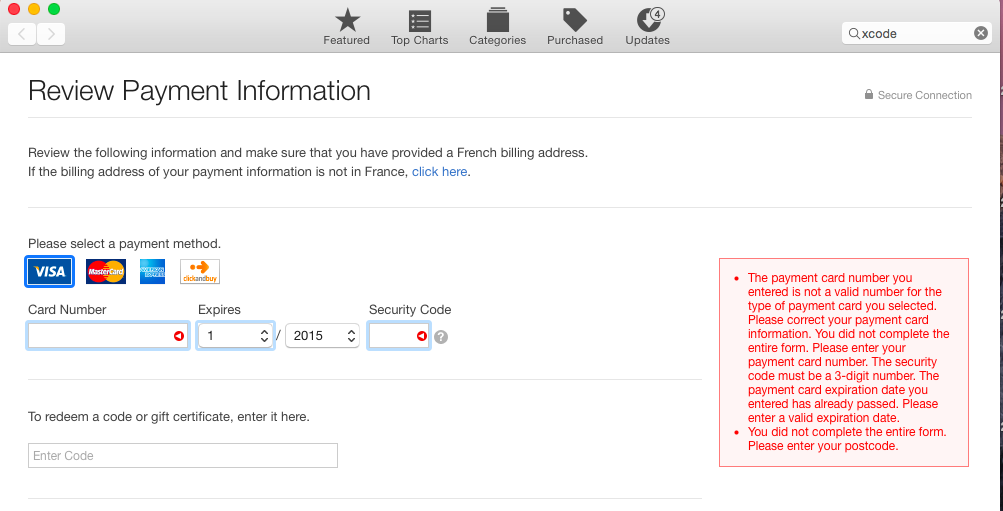
Let me try to download that fucking XCode. I open the app store. Create my account. It won’t fucking let me finish the procedure without me adding my credit card details :@

Screen Shot 2015-11-07 at 11.21.24 AM

WTH Apple?

UPDATE: I’m being able to download the XCode .dmg from this url: https://developer.apple.com/downloads/

Protect your NodeJS/Express routes with HTTP Basic Auth

Not all parts of your website or REST APIs you do require same level of protection. For example, a GET /api/dimounes is pretty harmless.

The Express/NodeJS code for such a route may be like follows:

app.get('/api/dimounes/',function(req,res){
  var rows = // Get the people from database, file or anywhere
  res.send(rows);
});

Let’s say now you want to add more ‘dimoune’. We create a new route for it but we’ll use HTTP POST verb instead of GET.

app.use(bodyParser.urlencoded({extended: true }));
app.use(bodyParser.json());

app.post('/api/dimounes/',function(req,res){
  var sql = "INSERT INTO dimounes (name,sex) VALUES ('" + req.body.name + "' , " + req.body.sex + ");";
  // run sql or mongo insert
  res.send("ok");
});

Problem here is everyone can do POST request and spam your database to corrupt it. Let’s protect the POST route so that it requires the user to authenticate.

$ npm install http-auth --save

Let’s define our username and password

var auth = require('http-auth');
var basic = auth.basic({
        realm: "Protected Area"
    }, function (username, password, callback) { // Custom authentication method.
        callback(username === "nayar" && password === "mydumbpassword");
    }
);

All we have to do is add auth.connect(basic) as a middleware in our routes we want to protect

app.post('/api/dimounes/',auth.connect(basic),function(req,res){
  var sql = "INSERT INTO dimounes (name,sex) VALUES ('" + req.body.name + "' , " + req.body.sex + ");";
  // run sql or mongo insert
  res.send("ok");
});

And there you go! Let’s try it with AJAX calls with jQuery 😉

$.ajax({
  method: "post",
  url: "/api/dimounes/",
  data: {
    name : "Nayar",
    sex: "male"
  },
  success: function( data ) {
    console.log(data);
  },
  });

You shall get a popup in your browser asking for your username and password. If you are using curl, just add the credentials using the -u

curl -nayar:mydumbpassword -H "Content-Type:application/json" -X POST --data '{"name":"nayar","sex":"male"}' http://example.com/api/dimounes

NOTE: As we saw in this article (click), Express doesn’t parse HTTP body, we have to add this line at the top for the above command to work in curl.

app.use(bodyParser.json());

MongoDB/MongooseJS: UPDATE ON DUPLICATE KEY

On SQL, it’s simple as hell. Well, if you got enough experience :3

CREATE TABLE thing (
id int PRIMARY KEY,
stuff varchar(20)
);

INSERT INTO thing (id,stuff) VALUES (45, "soz") ON DUPLICATE KEY UPDATE stuff = VALUES(stuff);

It’s done.

MongoDB as you must have heard already, it is NOT a relational database. Is it better than traditional ones? I am not going to start a flame war here. However note that I’m a hardcore SQL and ACID-compliance fan.

MongooseJS is used to validate data before storing in MongoDB. MongoDB is kinda dumb on its own which is not necessarily a bad thing as program logic is supposed to validate data and MongoDB developers can concentrate on making fast storage and reading capabilities. Let’s have some hands on with Mongoose:

var mongoose = require('mongoose');
mongoose.connect('mongodb://localhost/mycars');

var Car = mongoose.model('Car',{
  make: String,
  color: String,
  engine: {
    fuel : String,
    capacity: Number	
  },
  link: { type: String, unique: true}
});

As you can see, we described the characteristics with which e.g. we describe cars. Note that it differs from MySQL in the sense that you the fields can be further expanded as compared to the strict 2 dimensional tables.

Let’s create JavaScript car objects which we will store in the database.

var nayar_car = new Car ({
  make: "Maruti Suzuki :(",
  color: "purple",
  engine : {
    fuel : "petrol",
    capacity: 1000
  },
  link : "http://example.com/car/1"
});

Easy right? Let’s save it in a Mongo database

nayar_car.save(function(err){
  console.log(err);
});

Voila! No need for any SQLs.

The above will not work in case I repeat the insert with the same link as Car.link is supposed to be unique. You’d get an error like this:

E11000 duplicate key error index: mycars.cars.$link_1 dup key: { : “http://example.com/car/1” }

To make it work in an Insert or Update fashion, we modify the save code like this:

nayar_car.save(function(err){
  if(err && err.code == 11000){
    nayar_car._id = undefined;
    Car.update({link: nayar_car.link},nayar_car,{},function(err1,no){});
  }
});

Note that i had to unset the Car._id. It’s very important.

I’m not sure that I’m liking MongoDB/NoSQL way of doing things. I simply love SQL too much.

Refs:
http://stackoverflow.com/questions/21638982/mongoose-detect-if-document-inserted-is-a-duplicate-and-if-so-return-the-exist
https://jira.mongodb.org/browse/SERVER-340
http://docs.mongodb.org/manual/reference/method/db.collection.update/#upsert-parameter
http://stackoverflow.com/questions/21728879/mongodb-on-duplicate-key-update-behaviour
https://dev.mysql.com/doc/refman/5.0/en/insert-on-duplicate.html